Project · open source
Feuillet
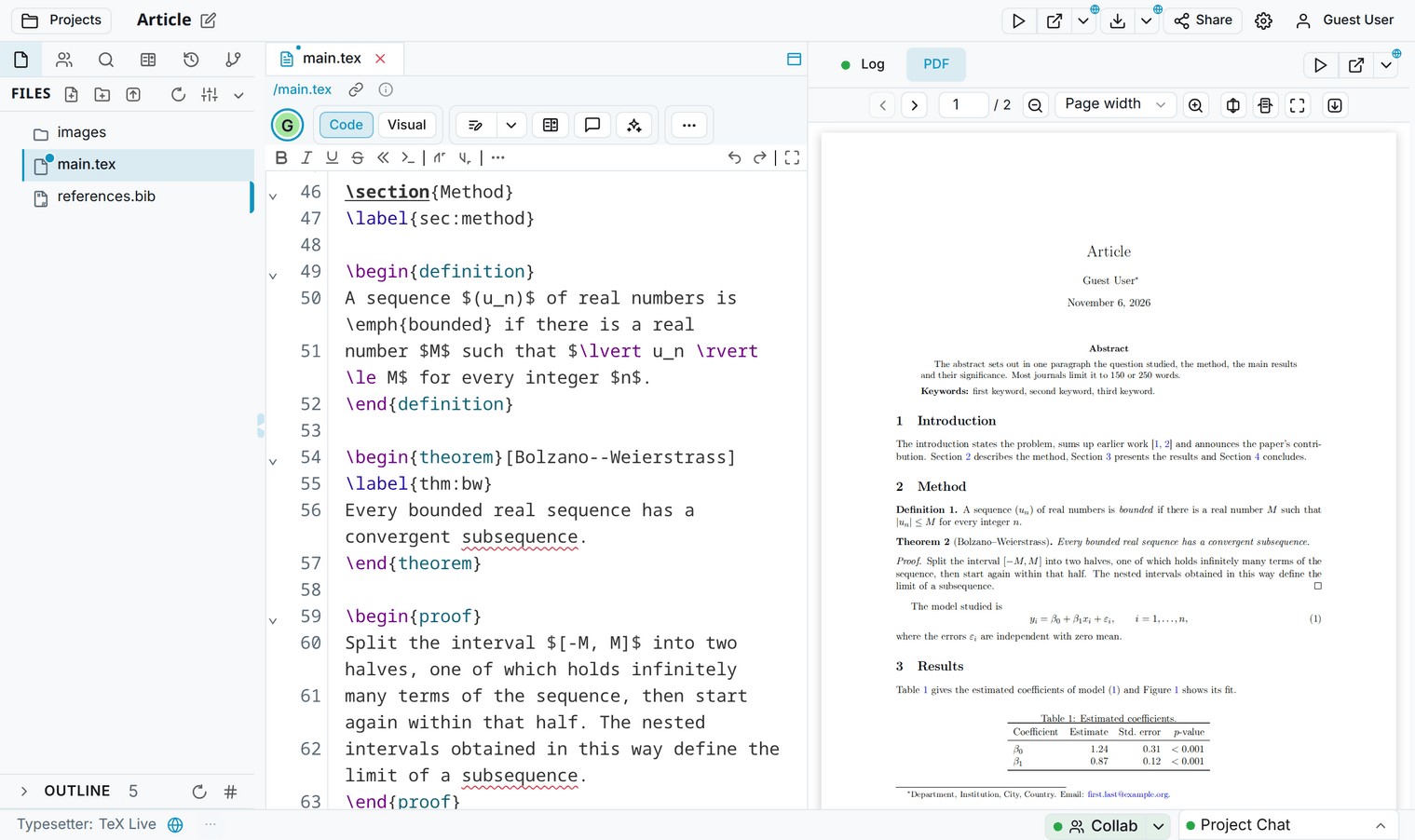
A collaborative online LaTeX editor in the spirit of Overleaf, connected to GitHub. Several people write in the same document, comment and track changes, and the project compiles with TeX Live.
Free · in the browser, nothing to install · French or English interface · no tracking, no advertising · user guide
What Feuillet does
Writing together
Collaborators write in the same text at the same time and see each other's cursors. The server keeps the project: nobody needs to be online at the same time.
Sharing
Invitations by account name or by email, with three roles: edit, review or read. Share links open the project too, and the owner can replace them.
Review
Comments and tracked changes, as in Overleaf: accept or reject from the text or from the panel. The server holds reviewers to comments and tracked changes.
Versions
Saved automatically, with their authors. Label a version (“Submitted”), compare any two, restore a file or the whole project.
TeX Live
Compiling runs on the server with pdfLaTeX, XeLaTeX or LuaLaTeX, with SyncTeX between the code and the PDF and explanations of common errors.
GitHub and Git
Link a project to a repository, push and pull with merging, publish a release with its PDF (and a DOI through Zenodo). A project can also be cloned with Git; GitLab, Gitea and Forgejo work the same way.
Claude
A connector lets Claude, under your own subscription, read, search, compile, comment and suggest changes, which arrive as tracked changes under its name.
Visual editor
Headings, lists, formulas, figures and tables look as they do in the document, with toolbars for figures and tables. The spell checker knows French and English.
LaTeX and Typst
From TeXlyre, Feuillet keeps Typst, the bibliography tools for Zotero and OpenAlex, draw.io and TikZ diagrams, the MathLive formula editor and Vim or Emacs keybindings.
Getting started
- Open feuillet.slashbin.net and choose Sign up: a name, a password and, if you wish, an email address. You can also sign in with Google or ORCID, or Try as Guest, without an account: projects then stay in the browser, for 24 hours.
- New project offers templates: paper, book, letter, homework, poster, presentation, report, thesis, CV. Import starts from a
.ziparchive (a project downloaded from Overleaf, for instance), a GitHub, GitLab, Gitea or Forgejo repository, or a web address. - Share, at the top of the editor, invites your collaborators.
The user guide covers the rest: collaborating, review, versions, GitHub, Git, Claude, your account.
Open in Feuillet
Like “Open in Overleaf”, a link creates a project in Feuillet from files or LaTeX code. The address https://feuillet.slashbin.net/docs takes the same fields as Overleaf's (snip_uri, snip, engine…): replacing one with the other is enough. In the README of a public repository, this badge opens a copy of the repository:

[](https://feuillet.slashbin.net/docs?snip_uri=https://github.com/OWNER/REPO/archive/HEAD.zip)Replace OWNER/REPO with the repository. Feuillet shows the files and where they come from, and creates the project only when asked.
With Claude
In Claude, on the web or in the desktop app, add a custom connector with this address, then sign in with your Feuillet account:
https://feuillet.slashbin.net/collab/mcpIn Claude Code:
claude mcp add --transport http feuillet https://feuillet.slashbin.net/collab/mcpClaude acts according to your role in each project: a reviewer leaves it only comments and suggestions. In the editor, the Ask Claude button prepares a request about the selected passage: improve the style, fix the spelling, translate, compile and fix the errors.
Privacy
Projects are kept in the browser and on the Feuillet server, for your other devices and your collaborators. Feuillet has no visit statistics, no advertising and no tracking cookies. GitHub tokens are encrypted and kept in the browser, not on the server. A project deleted for good, or a deleted account, is erased from the server; the nightly backups keep what was erased for two weeks at most. The Privacy link, at the bottom of Feuillet's pages, lists what the server keeps and the other services involved.
Under the hood
Feuillet is a fork of TeXlyre, a LaTeX and Typst editor that runs entirely in the browser. It keeps TeXlyre's editor, written in TypeScript with React and CodeMirror, and adds a server: documents are Yjs documents (CRDTs) relayed over WebSocket and stored on the server, instead of peer-to-peer connections, and compiling runs TeX Live in Docker. Apache serves the app and proxies both servers.
TeXlyre is funded by NLnet through the NGI0 Commons Fund, supported by the European Commission's Next Generation Internet programme.
License
Feuillet, like TeXlyre, is under the GNU AGPL 3.0 license. The user guide is in English and in French; questions and bug reports go to the GitHub issues.